Start with the guidance you trust.
Use your product guides, policies, and FAQs as the basis for routine answers. Begin with a topic your team knows well, then evaluate the response against the help you would normally provide.
AI CHATBOT / SENTRODESK
Give customers AI answers to routine questions, grounded in the support content your team provides. When the question needs a person, keep the conversation moving in Live Chat.
Included in Essential, Growth, and Enterprise.
THE WORK BEHIND GOOD SERVICE
Customers need help finding an invoice, understanding a policy, or using a feature. Your agents know the answers—but answering each question again takes attention away from requests that need their judgment. SentroDesk AI Chatbot puts your prepared support guidance to work in the customer conversation.
WHAT YOUR TEAM CAN DO
Use your product guides, policies, and FAQs as the basis for routine answers. Begin with a topic your team knows well, then evaluate the response against the help you would normally provide.
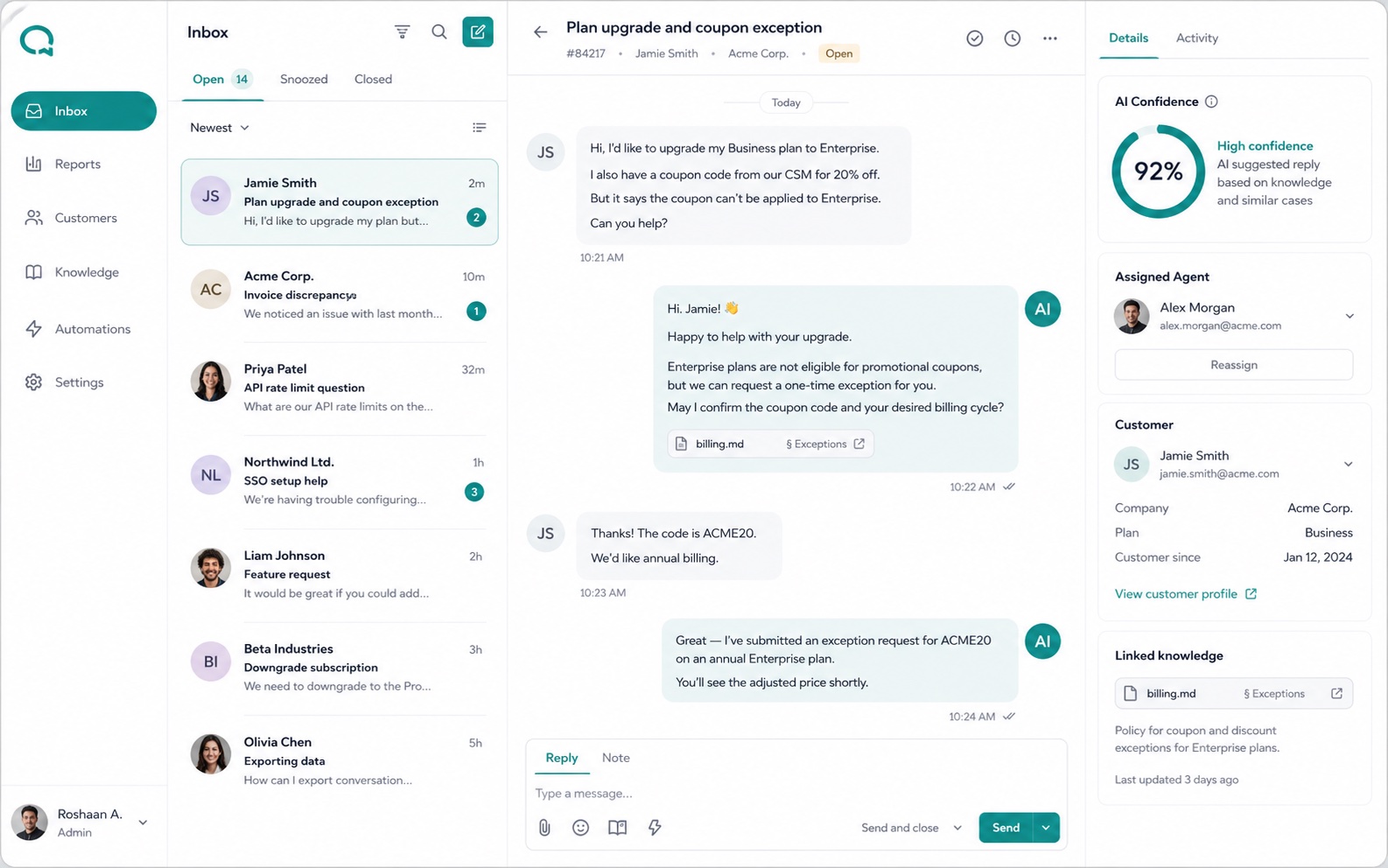
Review the source behind an AI reply. Your team can check whether the guidance addresses the question and identify explanations that need more attention.
Let an agent continue in Live Chat when the customer needs more help. Earlier messages remain available, so the next reply can build on what has already happened.
SEE AN ANSWER AND AN AGENT TAKEOVER
Switch between familiar questions and a request that needs a person. Open the source to see the illustrative guidance behind the answer.
A selectable product illustration. Replies are examples, not a live AI or support session.
A PRACTICAL WORKFLOW
Use a familiar customer request to explore the workflow with your team.
Walk Through a DemoA question arrives through your website widget or mobile app.
Your prepared support content informs the answer. Review the reply and its source.
Continue in Live Chat and create a linked ticket if the request needs follow-up.
PART OF THE SENTRODESK PLATFORM
AI Chatbot, Live Chat, and Tickets connect the answer to the follow-through. Growth adds Knowledge Base and Sentiment Analysis. Enterprise adds AutoQA.
BEFORE YOU GET STARTED
AI Chatbot is included in every plan. Our team explains content preparation for your account. The separate shared Knowledge Base feature is included in Growth and Enterprise.
Add the widget to your website or web platform, or integrate the SDK into your mobile app. Our team can explain the setup for your environment.
Choose Essential or Growth for a 14-day trial with no credit card required. Our team emails account details within 60 minutes; the trial begins when those details arrive. Enterprise evaluations are arranged with our team.
SEE IT WITH YOUR TEAM
Try AI answers with the questions your agents hear most often. Review the guidance, the response, and the handoff together.
14 days free. No credit card required.
Account details emailed within 60 minutes.